YT Levelr
A Firefox and Chrome extension that automatically equalizes the volume of YouTube videos, especially podcasts where every producer has their own idea of what the correct levels should be.
YT Levelr is a Featured extension on the Chrome Web Store and is available for both Firefox and Chromium-based browsers.
Features
- Automatic Loudness Normalization: Automatically adjusts audio levels between videos to create a consistent listening experience
- Smart Gain Management: Uses asymmetric gain limits (more aggressive cuts than boosts) to prevent sudden loud blasts
- Gradual Confidence Growth: Gain limits start narrow and widen linearly until full adjustment range is available at 30s, allowing the algorithm to make small initial corrections before committing to its final decision
- Drift Correction: Slow automatic correction every 3 minutes after lock to handle long-term level shifts
- Noise Floor Protection: Ignores silence periods to avoid skewing measurements
- Local Processing Only: All audio processing happens entirely within your browser - no data is collected or transmitted
- Cross Browser Support: uses Manifest V3 for compatibility with chrome/edge/comet and firefox
Installation
Firefox

Install from the official Firefox Add-on Store.
Chrome

Install from the official Chrome Web Store.
To install manually:
- Download and unzip the latest release from GitHub Releases
- Go to
chrome://extensions/, enable Developer mode
- Click “Load unpacked” and select the unzipped folder
How It Works
YT Levelr uses the Web Audio API to intercept audio output from YouTube’s video element and applies automatic gain correction:
- Audio Interception: Creates a source node from YouTube’s video element
- RMS Measurement: Continuously measures Root Mean Square (RMS) amplitude of the audio
- Gain Calculation: Compares measured level against your target level (default: -22 dBFS)
- Smooth Transitions: Applies gain changes with asymmetric attack/release times to protect against sudden loud sounds
- Locking: After 30 seconds, gain locks and only drift correction applies
Strategy Details
Usage
- Install the extension
- Reload any open YouTube tabs
- Play a video - the extension starts measuring immediately
- Click the icon to adjust target level (-30 to -12 dBFS recommended)
- After 30 seconds, gain locks for consistent levels
Re-measuring
Click “re-measure current video” in the popup if:
- The extension locked at an incorrect level
- You want a fresh measurement with new settings
Visual Indicators
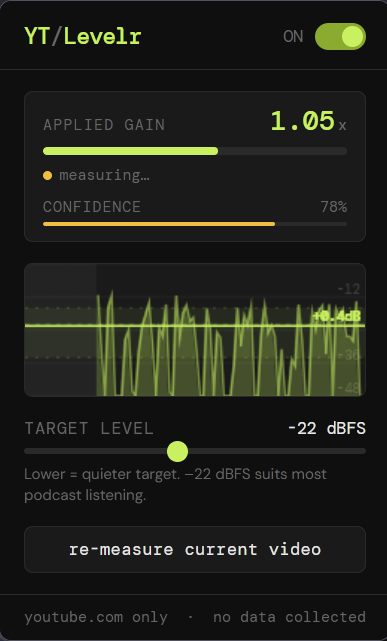
The popup displays real-time information:
- Applied Gain: Current gain multiplier being applied
- Status: Shows measuring, locked, or disabled state
- Confidence Bar: Progress toward full confidence (100% at 30s)
- Waveform Display: Visual representation of audio levels with target line
Limitations
Optimized Content Types
- ✅ Podcasts: Primary use case - spoken word content works excellently
- ✅ Interviews: Conversational audio normalizes well
- ✅ Audiobooks: Consistent narration levels handled correctly
- ✅ Lectures: Educational content with steady delivery
Known Limitations
- ⚠️ Music Videos: Extended quiet intros may not be handled correctly due to the confidence-based approach
- ⚠️ Dynamic Range Content: Music with extreme dynamic range may benefit from manual adjustment
- ⚠️ Very Quiet Audio: Content consistently below -48 dBFS may not trigger measurements
Browser Compatibility
- Firefox: Fully supported (tested on Firefox 150.3)
- Chrome: Fully supported (tested on Chrome 148)
- Comet: Fully supported (tested on Comet 147)
- install from the chrome web store when available
- Edge (and other chromium-based browsers): Not tested, should work
Privacy
YT Levelr is privacy-first:
- ✅ No data collection or transmission
- ✅ All processing happens locally in your browser
- ✅ Only stores
enabled and targetDB preferences locally
See Privacy Policy for complete details.
Technical Details
Architecture
graph TD
    A[YouTube Video Element] --> B[MediaElementSource<br/>audio interception]
    B --> C[DynamicsCompressor<br/>transient control]
    C --> D[GainNode<br/>adjustment]
    D --> E[AnalyserNode<br/>RMS measurement]
    E --> F[Destination<br/>output]

    classDef audioNode fill:#e1f5fe
    class B,C,D,E,F audioNode
Audio Processing Pipeline
- Input: Captures audio from YouTube’s video element
- Compression: Gentle dynamics compression to tame transient peaks
- Gain Adjustment: Applies calculated gain based on RMS measurement
- Analysis: Continuously measures output level for feedback
- Output: Delivers normalized audio to speakers
State Management
- Measurement Phase (0-30s): Actively measuring and adjusting gain within confidence limits
- Locked Phase (30s+): Gain locked, only drift correction applies
- Drift Correction: Every 3 minutes after lock, blends 10% toward new target based on recent measurements
Storage
The extension stores only two user preferences locally:
enabled: Whether the extension is activetargetDB: Your chosen target loudness level in dBFS
These values never leave your browser.
Contributing
Contributions welcome. See the GitHub repository for:
- Issue tracking
- Feature requests
- Pull requests
- Development guidelines
License
YT Levelr is open source. See the GitHub repository for licensing details.
Support
- Issues: GitHub Issues
- Documentation: See README, privacy policy, and reviewer notes
- Questions: Open an issue or pull request on GitHub
Homepage: https://github.com/AndyP2/yt-levelr